AI Voice Enhancer Free: Every Enhance-Speech Tool, Sorted by What It Does to Your Voice
Separators, studio-target enhancers and regenerators: nine AI voice enhancers filed by mechanism, with free caps read in October 2026.
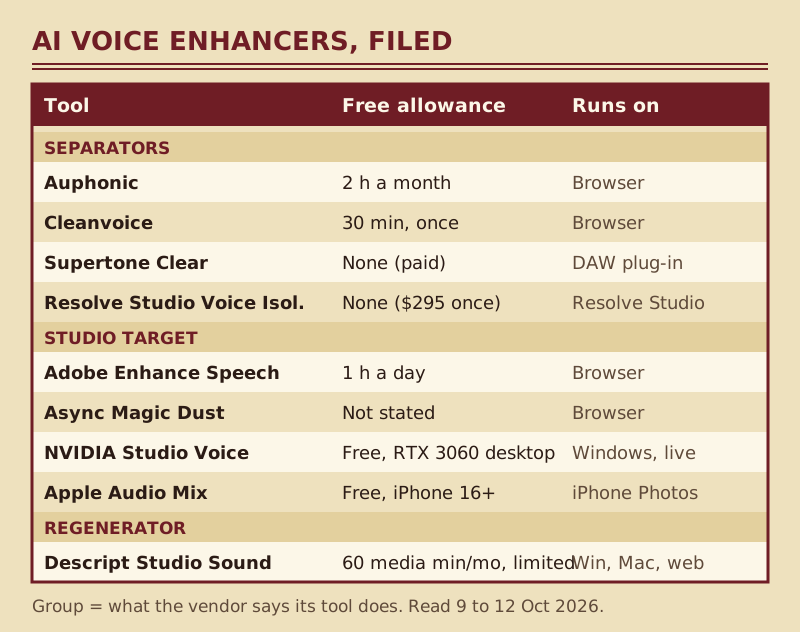
The most generous free AI voice enhancer for spoken recordings is Adobe Podcast's Enhance Speech, which processes as much as an hour of audio every day at no charge, in files of up to 30 minutes. Auphonic follows with 2 processed hours a month, Descript's free tier gives 60 media minutes monthly with its Studio Sound feature limited, and Cleanvoice credits 30 minutes once at sign-up. What the price tags hide is that these tools do different things to a voice, and the ones that sound most like a studio are the ones most likely to stop sounding like you.
So this index sorts every enhance-speech tool by mechanism first and price second. If the recording is decent and you only want the room gone, start with a separator; if it is rough and you will trade some likeness for polish, an enhancer that rebuilds the voice is the better bet. If you need this on a live call, none of the file tools apply, and the last section names the real-time options. Free caps and plan names were read on vendor pages between 9 and 12 October 2026.
Enhancer vs noise remover: the mechanism difference
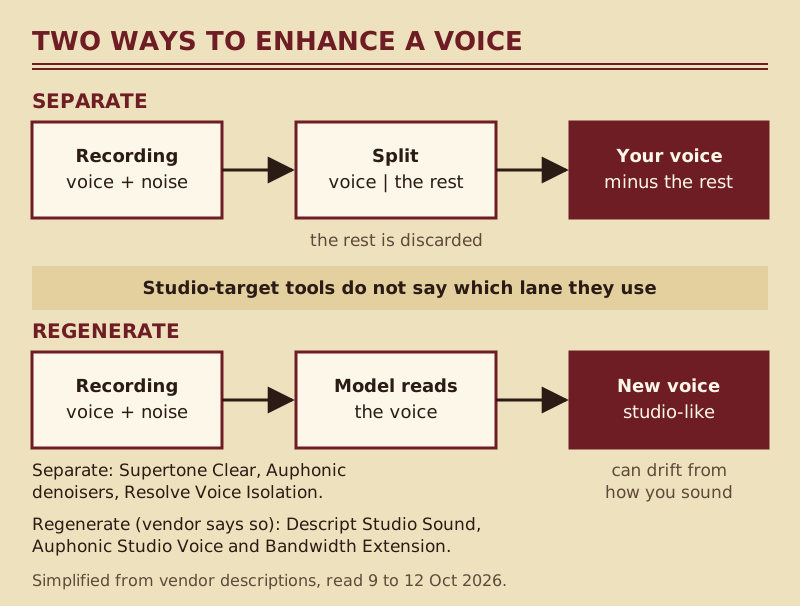
A noise remover is finished when the noise is gone. An audio enhancer, the product behind searches like audio enhancer and Adobe audio enhancer, keeps going: it changes the voice itself, its tone, brightness, level and sense of space. Vendors rarely publish how their models work, and this directory won't guess at internals. What vendors do publish is what they promise the output will sound like, and those promises fall into three groups that predict the result better than any feature grid.
Separators: your recorded voice, minus the rest
These tools describe their job as splitting the voice from everything around it and discarding the remainder. Supertone says Clear uses a voice separation network to pull the voice away from noise and reverb. Auphonic's Dynamic Denoiser keeps speech and music and removes the rest, and its Speech Isolation mode keeps speech alone. DaVinci Resolve Studio's Voice Isolation and Cleanvoice's noise removal belong here too. Because nothing is added, the timbre that comes out is the timbre the microphone caught, for better and worse.
Studio-target enhancers: a promised sound, an unstated method
The second group names a destination rather than a method. Adobe says Enhance Speech makes recordings sound as if they were made in a professional podcasting studio. Async says Magic Dust clears noise, evens out volume spikes and polishes the voice. NVIDIA pitches Studio Voice as a way to upgrade your mic and turn your room into a professional studio, and Apple's Studio mix in Audio Mix aims for the same effect on iPhone video. None of these pages says whether the voice is filtered or rebuilt, so judge them by ear on your own material.
Regenerators: the vendor says the voice is re-created
A few vendors are explicit. Descript says Studio Sound's AI is regenerative: it isolates the audio, then regenerates it, and the company contrasts this with tools that filter or subtract. Descript's separate Regenerate feature recreates a speaker's voice to smooth over edits. Auphonic's documentation describes a Studio Voice model that reconstructs a studio-quality voice, and a Bandwidth Extension that predicts and synthesizes missing high frequencies in muffled recordings. These are the tools with the biggest upside on bad audio and the biggest risk on good audio.
The catalogue: every enhance-speech tool, filed by mechanism
Each card gives the group, the free allowance, the first paid step where a price rendered for us, and where it runs. Where a vendor's pricing page wouldn't show a figure to a US reader, we say so instead of quoting a number from somewhere else.
Adobe Podcast Enhance Speech (studio target)
Free: one enhanced hour daily, with each upload capped at half an hour or 500 MB, accepting audio only, no strength control and no bulk queue. Premium lifts the daily ceiling to 4 hours and the per-file limit to 2 hours or 1 GB, accepts video, queues uploads in bulk and adds a strength slider; a 30-day trial comes first. Which bundle carries Premium depends on the page you read: one ties Premium to Adobe Express, while the plans page sells it inside the Firefly Pro plan, listed at US$19.99 a month on adobe.com when we checked on 9 October 2026. It runs in the browser and uploads your file. Full card: Adobe Podcast Enhance.
Descript Studio Sound (regenerator)
Free: each editor gets 60 media minutes monthly, and Studio Sound is marked limited at that level; the paid Hobbyist, Creator and Business tiers include it in full, with 10, 30 and 40 media hours. Paid prices didn't render on a US read, so check Descript's pricing page. Studio Sound sits inside a transcript-based editor for Windows, macOS and the web, which is the point of buying it: the cleanup happens where you already cut. Full card: Descript.
Async Magic Dust (studio target)
Async, the platform formerly known as Podcastle, lists Magic Dust under AI audio enhancement on its Essentials, Pro, Teams and Business plans. Essentials shows $11.99 a month on the yearly view, read 9 October 2026; whether the free tier includes Magic Dust isn't stated, and the free allowances that are listed are lifetime totals, not monthly ones. It runs in the browser. Full card: Async.
Auphonic (separator, with optional regeneration)
Free: 2 processed hours a month, without rollover. Paid recurring plans run from S at 9 hours a month to XXL at 250, yearly billing saves 20%, and one-time credit packs never expire; euro and dollar amounts didn't render on our US read. Auphonic is the one tool here that lets you choose the mechanism: separation through its denoisers, letting you set noise, reverb and breath removal independently, or reconstruction through its Studio Voice model. It runs in the browser on audio or video uploads. Full card: Auphonic.
Cleanvoice (separator)
Free: 30 minutes of credit at sign-up, a one-off rather than a monthly tier. Cleanvoice's own site lists wind, reverb, echo and general background noise among what it strips out, and the product is built around podcast chores such as filler words, so it suits batch cleanup more than tone shaping. Prices didn't render on a US read. Browser upload. Full card: Cleanvoice.
Supertone Clear (separator)
No free tier, only a limited trial: Clear is a paid plug-in in VST3, AU, VST and AAX formats, so it needs a DAW or editor host, and processing stays on your machine. It gives you the separated voice, ambience and reverb on their own controls, which makes it the most transparent option for producers who would rather mix than enhance. Full card: Supertone Clear.
DaVinci Resolve Studio Voice Isolation (separator)
No free route: Voice Isolation is one of the Studio-only audio tools, and DaVinci Resolve Studio sells for $295, paid once (Blackmagic's price on 9 October 2026). The free edition still has Fairlight Noise Reduction and the Dialogue Leveler. Processing is local, on the timeline, which matters for anyone working on video they can't upload.
NVIDIA Broadcast Studio Voice (studio target, live)
NVIDIA Broadcast is free, but it runs only on Windows 10 64-bit with a GeForce RTX 2060 or better, and Studio Voice specifically needs an RTX 3060 desktop GPU or higher. It works on your live microphone rather than on files, which makes it the odd one out in this list. Full card: NVIDIA Broadcast.
Apple Audio Mix (studio target, iPhone video)
Free on iPhone 16 or later for videos recorded in Spatial Audio. In Photos, the Studio option reduces background sound and reverb, and a slider sets how far it goes. It only works on the phone's own Spatial Audio clips, so it is a convenience rather than a general-purpose enhancer.
When regenerative enhancement goes wrong
Rebuilding a voice works best when the model has plenty of voice to work from. When it doesn't, because the speaker is far from the mic, the room is loud or the file is heavily compressed, the output leans on what the model expects a voice to sound like. The result can be a timbre that isn't quite the speaker's, breaths and laughter flattened into the same polished texture, and quiet words that come back smeared. Adobe's Premium strength control exists precisely to balance studio quality against natural environment sound, which tells you the default can overshoot.
The second failure is a mismatch rather than a defect. An enhanced voice sounds dry and close, as if recorded in a booth, so over video of a large hall or a street it no longer fits the picture. On a podcast the same problem shows up when one guest is enhanced and another isn't, or when an enhanced clip is spliced into untreated audio. Descript sells Regenerate partly to smooth over those tonal jumps between edits.
The fixes are dull and effective. Use the strength or mix control when there is one: Adobe Premium's slider, Auphonic's separate noise and reverb amounts, or the Mix Amount slider on Enhance Speech inside Adobe Premiere. Process a whole episode in one tool rather than mixing tools between segments. Compare against the original at the same loudness before you commit, because louder almost always sounds better on first listen. And if the source was fine to begin with, a separator usually beats an enhancer.
Picking by job: podcast, video, voice memo, archive
Podcast episodes
Levels matter as much as noise on a podcast, so Auphonic is the natural first stop: its leveler evens out speakers and its denoisers run in the same pass, and the free allowance covers 2 hours monthly. For anyone already editing in Descript, Studio Sound saves a round trip, but test it on your quietest guest first. Our noise removal software overview covers the wider post-production field.
Video
Adobe's free tier is audio only, so video means extracting the soundtrack and re-syncing it, or paying for Premium's MP4 and MOV support. Auphonic and Descript accept video directly. On iPhone 16 or later, Audio Mix handles Spatial Audio clips in Photos for nothing. For footage of a big space, prefer a separator so the voice still matches the room you can see.
Voice memos and phone recordings
Samsung's Audio Eraser works inside Voice Recorder on select Galaxy phones and tablets, and it is free. Otherwise the browser tools take phone files like any other, and Adobe's daily free allowance usually covers memos. Expect handling noise, the thumps and rubs of a phone in a hand, to survive any enhancer.
Archive and phone-quality audio
Old recordings and phone calls lack high frequencies altogether, and this is where synthesis earns its keep: Auphonic's Bandwidth Extension is designed to predict and recreate the missing brightness, and Descript's regenerative Studio Sound takes the same approach. Keep the untouched original, because a rebuilt archive is an interpretation, not a restoration.
Live calls
Every file tool above works after the fact. For a live microphone the options are different: NVIDIA Broadcast's Studio Voice if you have a qualifying RTX desktop, or a call filter such as Krisp. Krisp no longer offers a permanent free tier: new users get seven days with no card required; after that, Core is $8 a seat monthly when you pay for the year and $16 if you go month by month (Krisp's pricing page, 9 October 2026). Our AI background noise remover explainer covers the live side.
Edge cases
Two people on one track
Separators keep every voice they find, so crosstalk survives, and any enhancer has an easier job with one voice per track. If you recorded separate tracks, enhance each one on its own; if not, choose the lighter tool and accept some bleed.
Music under the voice
Speech-only modes remove music along with the noise. Auphonic's Dynamic Denoiser keeps both, and Adobe Premium's strength slider lets some natural environment sound back in. Otherwise enhance the dialogue before the music bed goes in.
Confidential material
Adobe, Descript, Async, Auphonic and Cleanvoice all process uploads on their servers. Supertone Clear, Resolve Studio and NVIDIA Broadcast work locally. If an agreement covers the recording, that difference decides the tool before quality does.
AI voice enhancers: frequently asked questions
Is there a free AI voice enhancer?
Yes. Adobe Podcast Enhance Speech is free for 1 hour of audio a day in files up to 30 minutes, Auphonic gives 2 processed hours a month, Descript allows 60 free media minutes monthly, with Studio Sound limited, and Cleanvoice credits 30 minutes once. NVIDIA Broadcast's Studio Voice is free with an RTX 3060 desktop GPU or better.
Is the Adobe audio enhancer free?
Enhance Speech has a free tier: 1 hour a day, 30 minutes and 500 MB per file, audio only, with no strength control. Premium adds video, bulk upload, a strength slider and 4 hours a day after a 30-day trial. Adobe's plans page now sells Premium inside the Firefly Pro plan.
Does an AI voice enhancer change your voice?
It can. Separators such as Auphonic's denoisers or Supertone Clear only remove what surrounds the voice. Tools that regenerate, which Descript says Studio Sound does, rebuild it, and on weak recordings the result can drift from how the speaker really sounds. A strength or mix control limits the drift.
What is the best audio enhancer for video?
For one-off clips, Auphonic and Descript take video files directly; Adobe Enhance Speech needs Premium for video. On iPhone 16 or later, Audio Mix in Photos is free for Spatial Audio clips. If the scene shows a large or outdoor space, prefer a separator so the voice still fits the picture.
Can I enhance a voice recording with AI on my phone?
Yes. Samsung's Audio Eraser works in Voice Recorder and the Gallery editor on select Galaxy devices, iPhone 16 and later can use Audio Mix on Spatial Audio videos, and the browser tools, Adobe Enhance Speech included, accept files uploaded from a phone.