SteelSeries Sonar
- Real-time
- Windows
- Free tier
7.5DexScore
Free mic cleanup plus a per-app mixer. Windows only, any headset, launcher required.
Free mic cleanup plus a per-app mixer. Windows only, any headset, launcher required.
| Platforms | Windows only: SteelSeries lists Windows 10 (RS5+). No macOS or Linux build. Runs inside the SteelSeries GG app. |
|---|---|
| Price | Free download. The Sonar page shows no paid tier. |
| Free tier | Everything is free. Any headset or mic works; SteelSeries hardware is optional |
| Direction | Your mic, plus SteelSeries' claim that it reduces "team noise" in chat |
| Mechanism | AI noise cancellation (ClearCast) running on the CPU, plus virtual audio devices for game, chat, media, aux and mic |
| Status | Active |
| Best for | Windows gamers who want EQ, a game/chat mix and mic cleanup in one free install |
Every figure above was checked against vendor pages — pricing, help center, release notes — on the printed date. Tables are re-verified quarterly; a tool that dies between passes is removed from the index, not annotated.
SteelSeries Sonar is safe to install and good at what it was built for: a free Windows audio layer that splits your sound into game, chat, media and aux channels, adds a parametric EQ and spatial audio, and runs AI noise cancellation on your microphone. It needs the SteelSeries GG app, works with any headset, and does nothing on a Mac or Linux. If you are looking for a SteelSeries Sonar alternative, first work out which of those jobs you are replacing. The EQ, the mixer and the mic filter each have a different best replacement, and no single free tool does all three.
Skip Sonar if you are on macOS or Linux, you dislike running a game launcher in the background, or the only thing you need is a cleaner voice on work calls.
Yes. Sonar is free software from a mainstream peripheral maker, distributed from steelseries.com, and nothing about it behaves like malware. What makes people ask is what it does to Windows. Sonar works by creating virtual audio devices that sit between your real headset and your apps. SteelSeries' own Discord guide (read 9 Oct 2026) tells you to set Discord's output to "SteelSeries Sonar - Chat" and its input to "SteelSeries Sonar - Microphone". The Sonar page describes separate game, chat, media, aux and mic sources, and Streamer Mode adds a "Sonar Stream" source for broadcasting software.
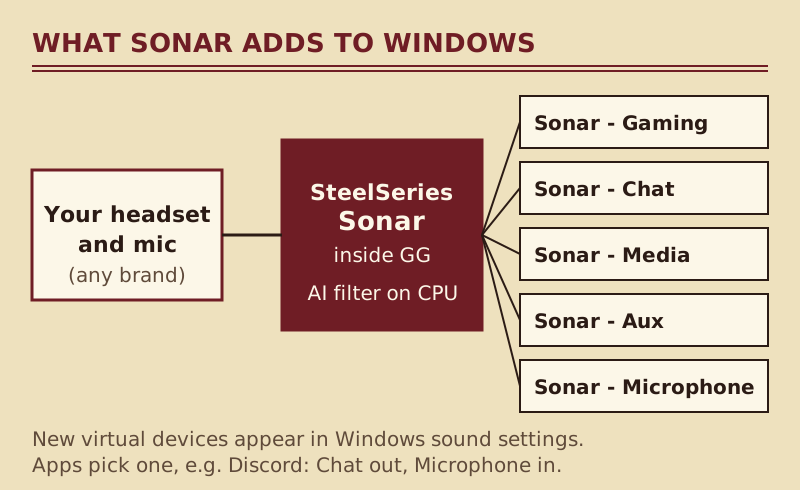
So after installing Sonar you will see several new playback and recording devices in Windows' sound settings. That is expected, and it is why Sonar can mix one app louder than another. It is also why a security tool might pause the installer: anything that adds audio drivers asks for elevated rights. Download it only from SteelSeries' own site, never from a mirror or a "Sonar unlocked" bundle, and the warning is about the driver install rather than a threat.
What about privacy? SteelSeries says its noise cancellation "does not use the GPU, only the CPU" (SteelSeries blog, dated 2022). In plain terms, the model runs on your own processor. SteelSeries' Sonar page lists no account requirement, so we make no claim either way about sign-in.
As a free Windows tool, it is good. The strengths and limits below come from SteelSeries' Sonar page and the GG documentation as read on 9 Oct 2026.
People who search for a Sonar alternative usually want one of five things. Here they are, each with its replacement. Prices and platforms were read on the vendor pages on 9–10 Oct 2026.
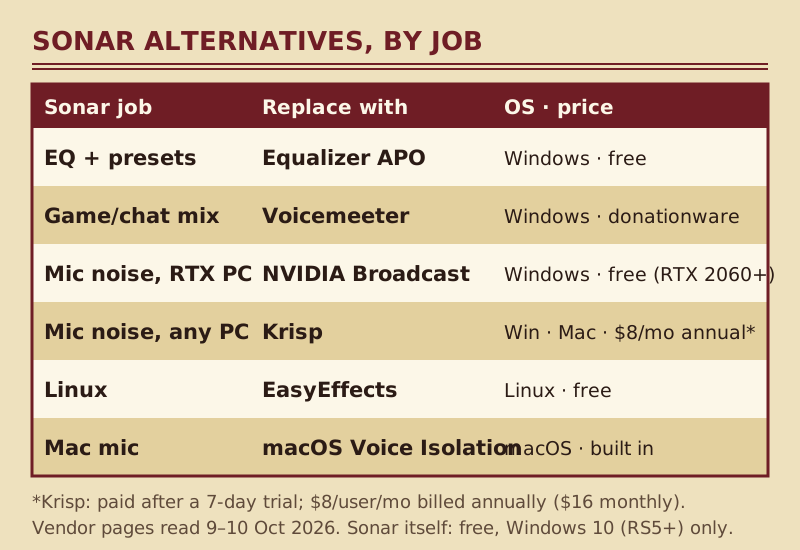
| Sonar job | Replacement | OS | Price | Link |
|---|---|---|---|---|
| Parametric EQ and presets | Equalizer APO | Windows (7–11 tested) | Free, GPLv2 open source | direct link |
| Simple EQ and bass presets | FxSound | Windows only | Free and open source | direct link |
| Game/chat mix and app routing | Voicemeeter (Banana, Potato) | Windows (XP to 11) | Donationware: all functions free, pay what you want | direct link |
| Mic noise (the ClearCast job) | NVIDIA Broadcast | Windows 10 64-bit listed; RTX 2060 or better | Free | NVIDIA Broadcast profile |
| Mic noise on any hardware, plus echo | Krisp | Windows 10/11, macOS 14+ | Paid after a 7-day trial without a card: Core $8/user/mo billed annually or $16 monthly | Krisp trial |
| Two-way call cleanup for support teams | IRIS Clarity | Windows and Mac desktop apps | £6.50 per seat, billed monthly | IRIS Clarity trial |
| Linux EQ and noise removal | EasyEffects | Linux (PipeWire) | Free, GPL-3.0 | direct link |
| Mac mic cleanup | macOS Voice Isolation | macOS | Built in | macOS Voice Isolation profile |
Equalizer APO is the closest functional match. It describes itself as "a parametric / graphic equalizer for Windows" and works system-wide as an Audio Processing Object, so every app goes through it without any routing. It is GPLv2 open source, and version 1.4.2 is the newest release listed on SourceForge (read 10 Oct 2026). The trade-off is setup: there is no slick preset store, and you edit filters yourself or add a third-party interface. FxSound is the gentler choice. It became free in 2022 and open source in 2023, it is Windows only, and it gives you an equaliser, effects and presets aimed at volume and bass. Neither one cleans up your microphone.
Voicemeeter is the tool streamers move to. VB-Audio describes it as an audio mixer "endowed with Virtual Audio Device", which is the same idea as Sonar's channels with far more control and a steeper learning curve. Voicemeeter Banana adds more inputs and outputs, an integrated recorder and full parametric EQs; Potato goes further still. It is donationware: free to use with all functions, and after 30 days the About box asks you to buy a licence or keep evaluating. There is no Mac version listed.
This is the job most worth getting right, because a bad filter is the one your teammates hear. Gamers whose Windows PC already carries an RTX 2060 or a higher-tier RTX card can use NVIDIA Broadcast as the free like-for-like swap. It adds Noise Removal, Room Echo Removal and Studio Voice; NVIDIA lists Windows 10 64-bit, driver R570 or newer and 8 GB of RAM, and Studio Voice needs an RTX 3060 desktop GPU or better. If you only talk in Discord, its built-in Krisp filter is free inside Discord and needs nothing else.
Without an RTX card, or on a Mac, a desktop filter that runs on the CPU is the realistic answer. Krisp works in every call and chat app through its own virtual microphone and speaker, cleans both directions, and adds echo cancellation, which Sonar's page never mentions. It is paid software, though: a week-long trial needs no card, and a subscription follows.
For support and sales desks rather than gaming, IRIS Clarity cleans both ends of a call. IRIS says it removes noise "at both the customer and agent end of the call", and only one side needs the app. It costs £6.50 per seat, billed monthly, after a free trial (the pricing page says 14 days).
Sonar has no Linux build. EasyEffects is the answer: a GPL-3.0 effects suite for PipeWire with an equaliser, a limiter and compressor, a "Noise reduction" effect that uses RNNoise, plus a "Deep noise remover" based on DeepFilterNet. The project points to Flathub for installs. One caution from the project itself: its README calls easyeffects.org "probably a scam" with no link to the author, so install from your distribution or from Flathub.
Sonar has never existed for macOS, and we have no verified free Mac equivalent of its mixer in this index. For the microphone job, start with macOS Voice Isolation, a Mic Mode Apple ships in the system. Apple names FaceTime as an app that supports it and says options vary by app. If you need it across every call app, Krisp runs on macOS 14 or later.
These three get compared because they all sit between Windows and your headphones, but you can only download two of them. SteelSeries' own comparison post (19 Jul 2023) says Nahimic "comes preinstalled on selected partner PCs", naming laptops such as MSI and Lenovo Legion, and that "it is not possible to download Nahimic independently". If your laptop shipped with Nahimic, keep it or remove it; if it did not, Sonar is the SteelSeries option you can actually install.
| Field | Sonar | Nahimic | Voicemeeter |
|---|---|---|---|
| How you get it | Free download inside SteelSeries GG | Preinstalled on selected partner PCs only | Download from VB-Audio |
| Price | Free | Comes with the PC | Donationware |
| OS | Windows 10 (RS5+) | Windows (partner PCs) | Windows XP to 11 |
| Mic noise cancellation | Yes (AI, CPU) | n/a for a download decision | No dedicated AI filter on the product page |
| Per-app mixing | Game, chat, media, aux, mic | n/a | Virtual inputs and buses, more manual |
| Learning curve | Low | n/a | High |
Choose Voicemeeter over Sonar when you need routing Sonar won't do, such as feeding a stream and a recording different mixes. Choose Sonar when you want a ready-made gamer mix and a mic filter without wiring buses yourself.
These two overlap only on the microphone. Both are free Windows downloads with AI noise removal, but they run in different places. NVIDIA Broadcast needs an NVIDIA RTX card: its requirements page lists an RTX 2060 or higher and 8 GB of RAM (read 25 Oct 2026). Sonar's ClearCast filter works with any mic and, in SteelSeries' words, is "CPU-based to prevent frame drops". Broadcast adds Room Echo Removal and Studio Voice, so it is the better pick if you already own an RTX card and your room echoes. Sonar is the better pick if you also want its game/chat mixer and EQ, or if there is no RTX card in the PC. Run noise cancellation in one of them, not both.
If you are switching, remove Sonar before you install its replacement, because two layers of virtual devices make any problem hard to trace.
If a Sonar device still appears after the uninstall, restart Windows before you change anything else.
Yes. It is free software from SteelSeries, downloaded from steelseries.com, and it runs its noise cancellation on your own CPU. It adds several virtual audio devices to Windows, which is how its mixer works and why a security tool may ask before the driver installs. Checked 9 Oct 2026.
Yes. The Sonar page offers a free download inside SteelSeries GG and shows no paid tier, and it works with any headset or microphone, not just SteelSeries hardware. Checked 9 Oct 2026.
It depends on the job you are replacing: Equalizer APO for the EQ, Voicemeeter for game and chat mixing, NVIDIA Broadcast (RTX GPUs) or Krisp for mic noise, EasyEffects on Linux, and macOS Voice Isolation on a Mac.
No. SteelSeries lists only Windows 10 (RS5+). On Linux, EasyEffects covers both the EQ and noise removal. On a Mac, use Voice Isolation for the microphone, or Krisp if you need it in every call app.
For most people the question settles itself: Nahimic comes preinstalled on selected partner PCs and cannot be downloaded on its own, per SteelSeries. If your PC didn't ship with it, Sonar is the one you can install.
For mic noise they do the same job on different hardware. NVIDIA Broadcast needs an NVIDIA RTX card (RTX 2060 or higher) and adds Room Echo Removal; Sonar runs on the CPU with any mic and adds a game/chat mixer and EQ. With an RTX card and an echoing room, pick Broadcast. Otherwise on Windows, Sonar.
7.5 of 10, inked hole by hole