Is It Safe? Four Checks for NVIDIA Broadcast, Audacity, Krisp, Sonar and Every Tool in the Index
Where to download it, what it adds to your system, where the audio goes, and what account it wants. Five tools, checked.
Yes, the noise tools people ask about most are safe when they come from the vendor's own site: NVIDIA Broadcast from nvidia.com, Audacity from audacityteam.org, Krisp from krisp.ai, SteelSeries Sonar from steelseries.com. The ones that worry people do so for a reason that isn't malware. They add virtual audio devices or drivers to your system, so security software may pause the installer and your sound settings fill with new names. The real risks are elsewhere: a copy from a mirror site, a cracked "unlocked" build, or a browser tool you didn't realize uploads your recording.
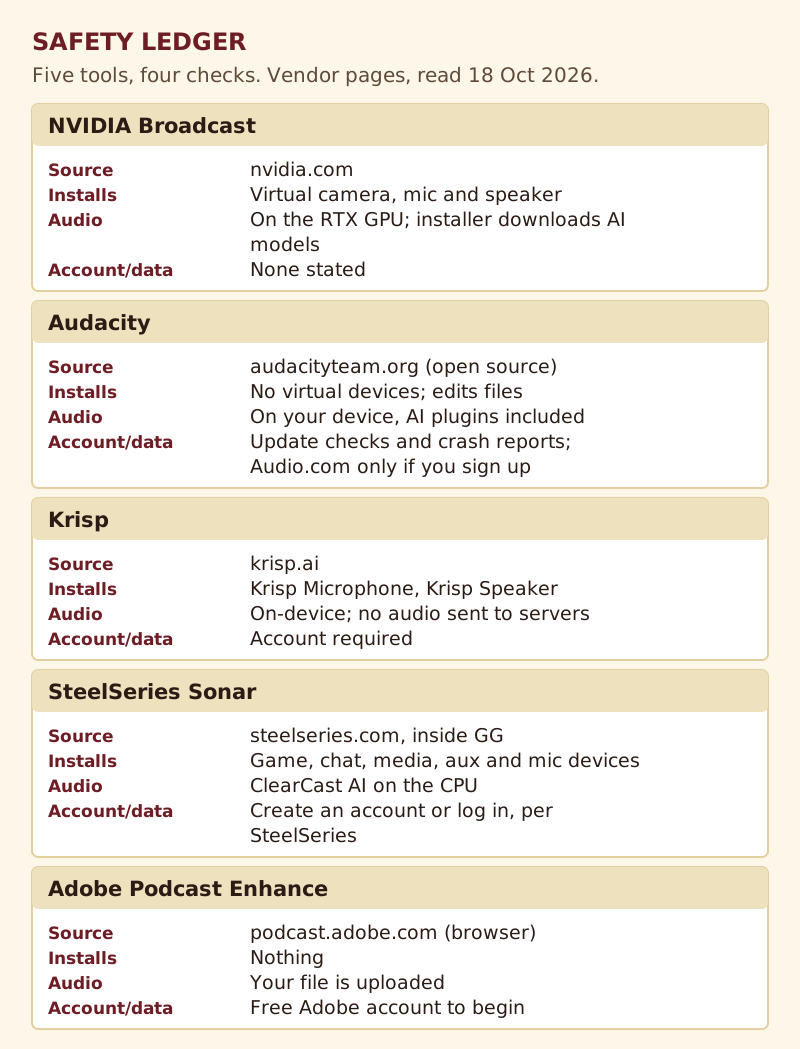
This directory already rates tools on what they do. This page rates them on four safety checks instead: where to get them, what they add to your machine, where your audio is processed, and what account or data they ask for. Every answer comes from the vendor's own pages, read on 18 October 2026. Where a vendor doesn't say something, we say so rather than guess.
The four checks, and why each one matters
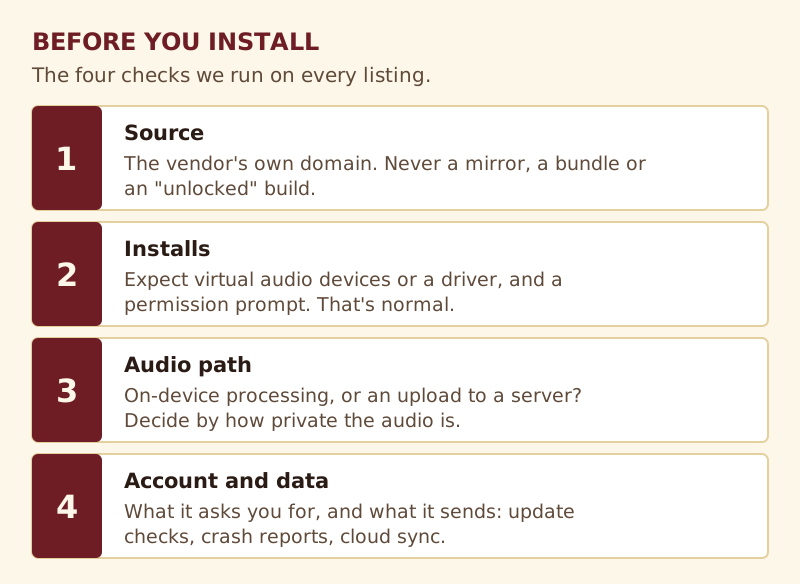
Most "is it safe" questions are really one of four smaller questions. Separating them gives a clearer answer than a yes or no.
Source. Who distributes the installer, and is that the address you're downloading from? A tool that is perfectly safe from its maker can be unsafe from a mirror, because you can't know what was changed.
What it installs. Real-time noise tools slot a software-only audio device in the path from your microphone to your apps. That needs elevated rights, which is why Windows or an antivirus product may ask before allowing it. The prompt is about the driver, not a verdict on the tool.
Where the audio goes. Desktop tools that process on your own machine never send the sound anywhere. Browser tools upload your file to a server first. Neither is unsafe, but they suit different recordings.
Account and data. Some tools need an account; some send update checks or crash reports. This matters most at work, where a compliance team may ask.
Is NVIDIA Broadcast safe?
Yes, from nvidia.com. NVIDIA says Broadcast works by creating a virtual Windows camera, microphone and speaker that your apps treat as ordinary hardware, and its effects run in real time on the Tensor Cores of a GeForce RTX card. Two things surprise people. The installer downloads the latest AI models during setup, only the ones your GPU needs, so keep the PC online while it runs. And it needs a supported card: the floor in NVIDIA's FAQ is a GeForce RTX 2060, with Quadro RTX 3000 and TITAN RTX also listed. NVIDIA's FAQ didn't say, when we read it, whether any audio or video leaves your PC during use; it describes the processing as running on the GPU. Our NVIDIA Broadcast profile has the rest of its requirements.
Is Audacity safe?
Yes, from audacityteam.org. Audacity is free and open source, and the download page offers the source code alongside the installers, so anyone can inspect or build it. The current version on that page is 4.0.1, with builds for Windows (x86_64 and ARM64), macOS and Linux.
Audacity's own guide for system administrators is unusually specific about data. By default Audacity collects minimal data for update checking and crash reporting, the only personal data stored is a UUID, which you can switch off in preferences, and that data is stored in the Netherlands. Its AI plugins process everything on your device rather than in a cloud, which is why their installer is large. The Audio.com cloud integration only activates if you sign up. To switch update checks off, go to Preferences, then General; to remove the cloud features, disable mod-cloud-audiocom under Preferences, then Modules. Builds compiled from source have no network features by default. Audacity works on files, not live calls; see its profile.
Is Krisp safe?
Yes, from krisp.ai. Krisp's help center says installing it creates two virtual devices, Krisp Microphone for what you send and Krisp Speaker for what you hear, and that all processing happens locally. Its noise cancellation article goes further: the audio processing happens on-device, with no audio sent to external servers. That covers the noise features; Krisp's meeting-notes features are a separate product area, and its Trust Center is where Krisp points for compliance details.
Krisp needs an account. As of 26 October 2026 it also has no free plan: the trial runs seven days and asks for no card, and afterwards Core is $8 per user monthly when you commit to a year; without that commitment it's $16. That's why "unlocked" Krisp downloads circulate, and why to avoid them.
Is SteelSeries Sonar safe?
Yes, from steelseries.com, inside SteelSeries GG. Sonar creates a virtual device for each of its mixer channels plus a virtual microphone, which is why several new entries appear in Windows sound settings after you install it. According to SteelSeries, ClearCast AI does its work on the processor rather than the graphics card. One update to what this directory has said before: the ClearCast setup guide on SteelSeries' blog starts by having you register or sign in to GG. The full breakdown is on our Sonar profile.
Browser tools: safe, but your file travels
Adobe Podcast Enhance installs nothing, which removes one risk and adds a different one. Adobe asks you to sign up for a free account to begin, then you upload the recording, and it's processed on Adobe's side before you download the result. For a podcast that's going public anyway, that's no concern. For a confidential interview, a medical consultation or anything under an NDA, check your organization's rules before uploading. Our Adobe Podcast Enhance profile lists its free limits. If the file can't leave the building, local tools such as Audacity or the OBS noise filters do the job offline.
Where the real risk is
Mirrors, bundles and "unlocked" builds
A noise tool sits on your microphone, and some add drivers that load with Windows. That's the most privileged position an attacker could ask for. Download only from the vendor's domain, and treat any "cracked", "pro unlocked" or "lifetime key" offer for Krisp, Broadcast or anything else as a reason to leave. Krisp, the paid tool on this page, offers seven trial days without asking for a card, so there's no reason to need one.
Renamed products
When a tool changes its name, old download links can outlive it. Podcastle became Async, and our moved signpost points to the right place. If a download page carries a name the vendor no longer uses, find the current site first.
Your security software paused the installer
That's normal for anything that adds audio drivers. If the file came from the vendor's own site, allowing it is the expected step. If you can't say where the file came from, delete it and download again from the source.
"Is it safe" meaning "will it slow my PC"
Different question, honest answer: real-time processing always costs something. Broadcast spends GPU time, Krisp and Sonar spend CPU time, and Audacity costs nothing until you run an effect. Test on a real call before you rely on it. Our noise cancelling app for Windows guide sorts the options by GPU.
Safety questions, answered
Is NVIDIA Broadcast safe to install?
Yes, from nvidia.com. It creates a virtual camera, microphone and speaker, runs its effects on an RTX GPU, and downloads AI models during installation. Those virtual devices are expected, and so is a permission prompt during setup.
Is Audacity safe to download?
Yes, from audacityteam.org. It's open source, collects minimal data for update checks and crash reports by default, and its AI plugins process audio on your device. You can turn off update checks and the Audio.com module in preferences.
Does Krisp send my audio to the cloud?
Not for noise cancellation. Krisp says noise cancellation runs on your device with no audio sent to external servers. Its meeting-notes features are separate; check Krisp's Trust Center if your organization needs details.
Why does my antivirus warn me about a noise cancelling app?
Because real-time tools install virtual audio devices or drivers, which need elevated rights. From the vendor's own site, that prompt is expected. From anywhere else, don't install it.
Are free noise cancelling apps safe?
The free tools in this index are, from their official sources: NVIDIA Broadcast, Audacity, SteelSeries Sonar and OBS. A free download of a paid tool is the one to avoid, because the only way to give it away is to modify it.